Efecte Self-Service 2 (ESS2) 2023.3.0, release notes
Efecte Self-Service 2 (ESS2) 2023.3.0, release notes
Executive Summary
The Efecte Self-Service 2 (ESS2) 2023.3.0 release introduces a new administration user interface for managing Forms, support for Efecte Chat, upgraded search on the ESS2 homepage, form-specific default values, and new form field types.
Removing the Form editor from the Template configuration area and introducing the new Form editor to the Self-Service administration area is the first step to even easier administration of the ESS2. The new Forms editor will give even better tools for self-service administrators to configure content.
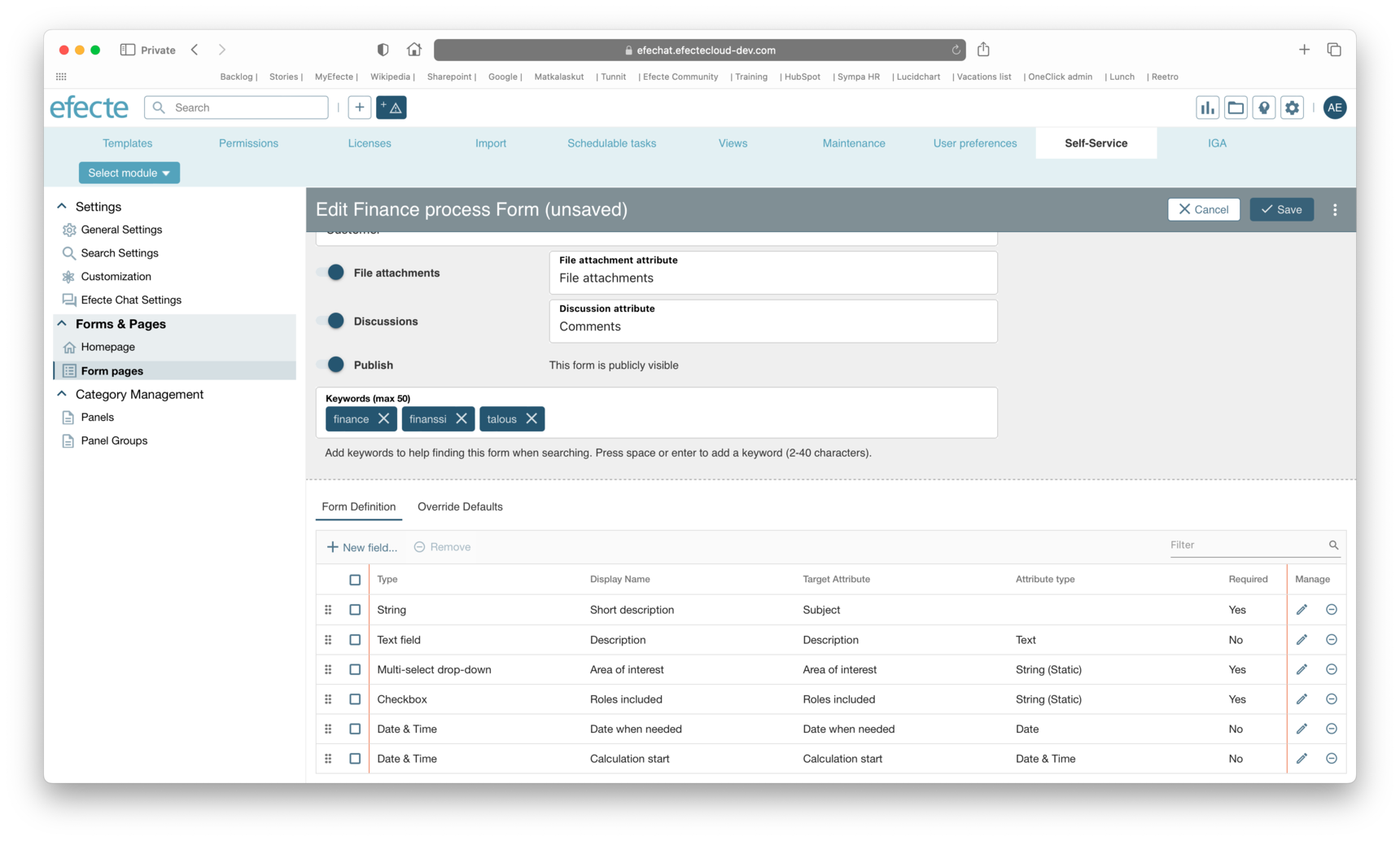
Efecte Chat functionalities, as they were introduced on top of the ESS, can be also used on top of the ESS2.
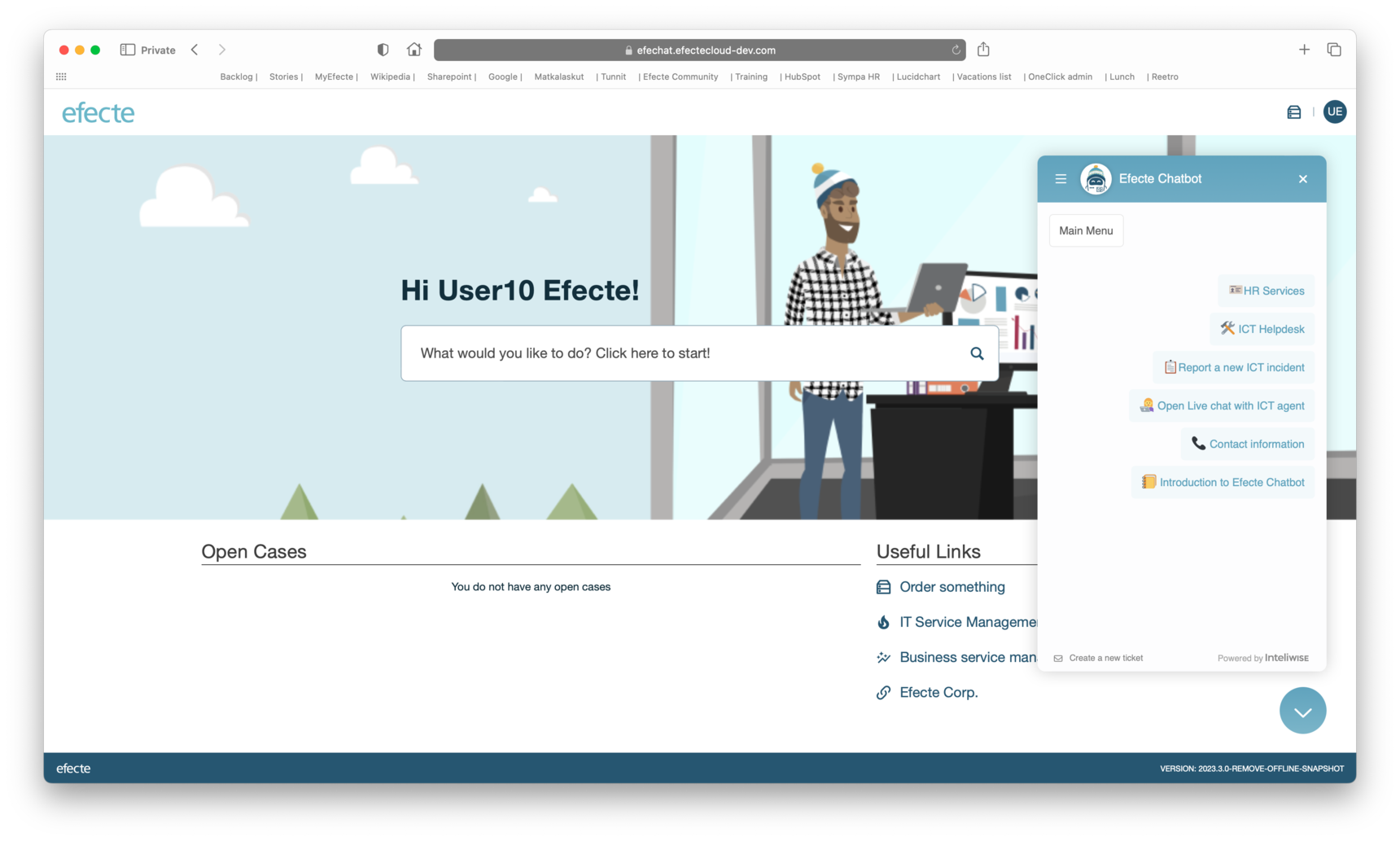
To give the end users better search results from the defined Forms and Product catalog items, the ESS2 search results mechanism needs to be updated. With more precise and classified results pages, including keyword search, the end users will get more help when using ESS2.
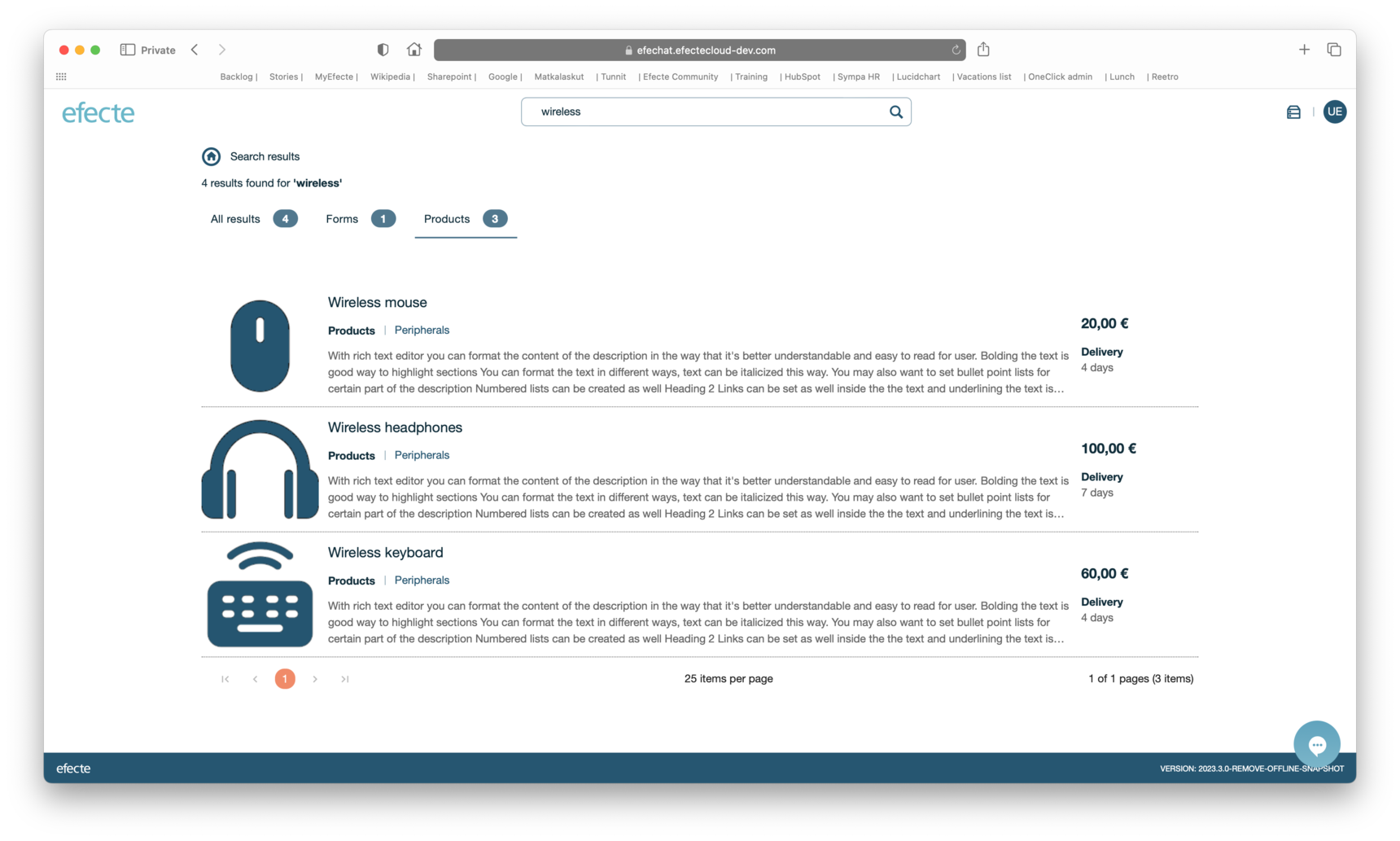
The self-service configuration area for ESS2 will introduce a new configuration option for the forms. For each Form, the admin can configure one or many override values.
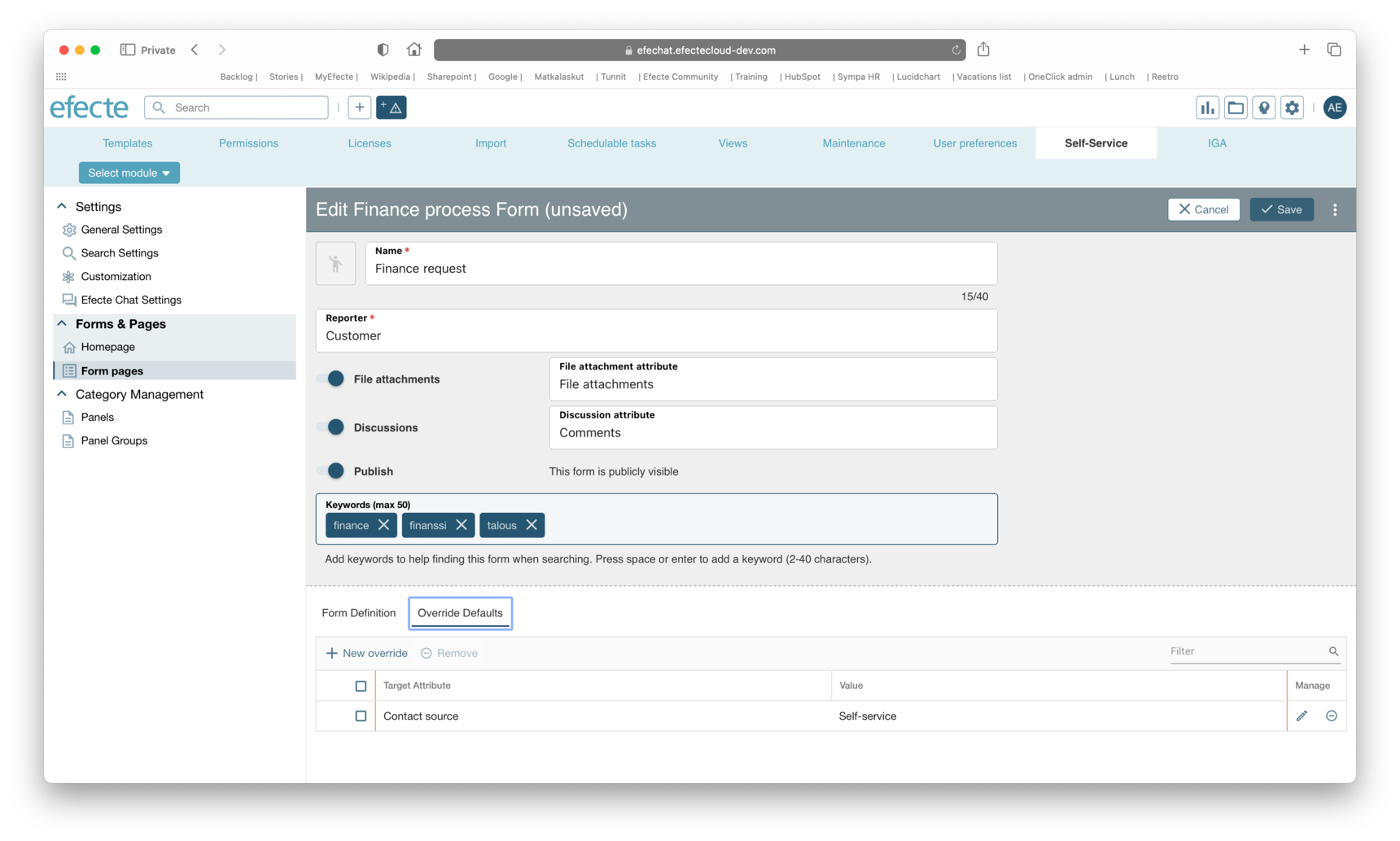
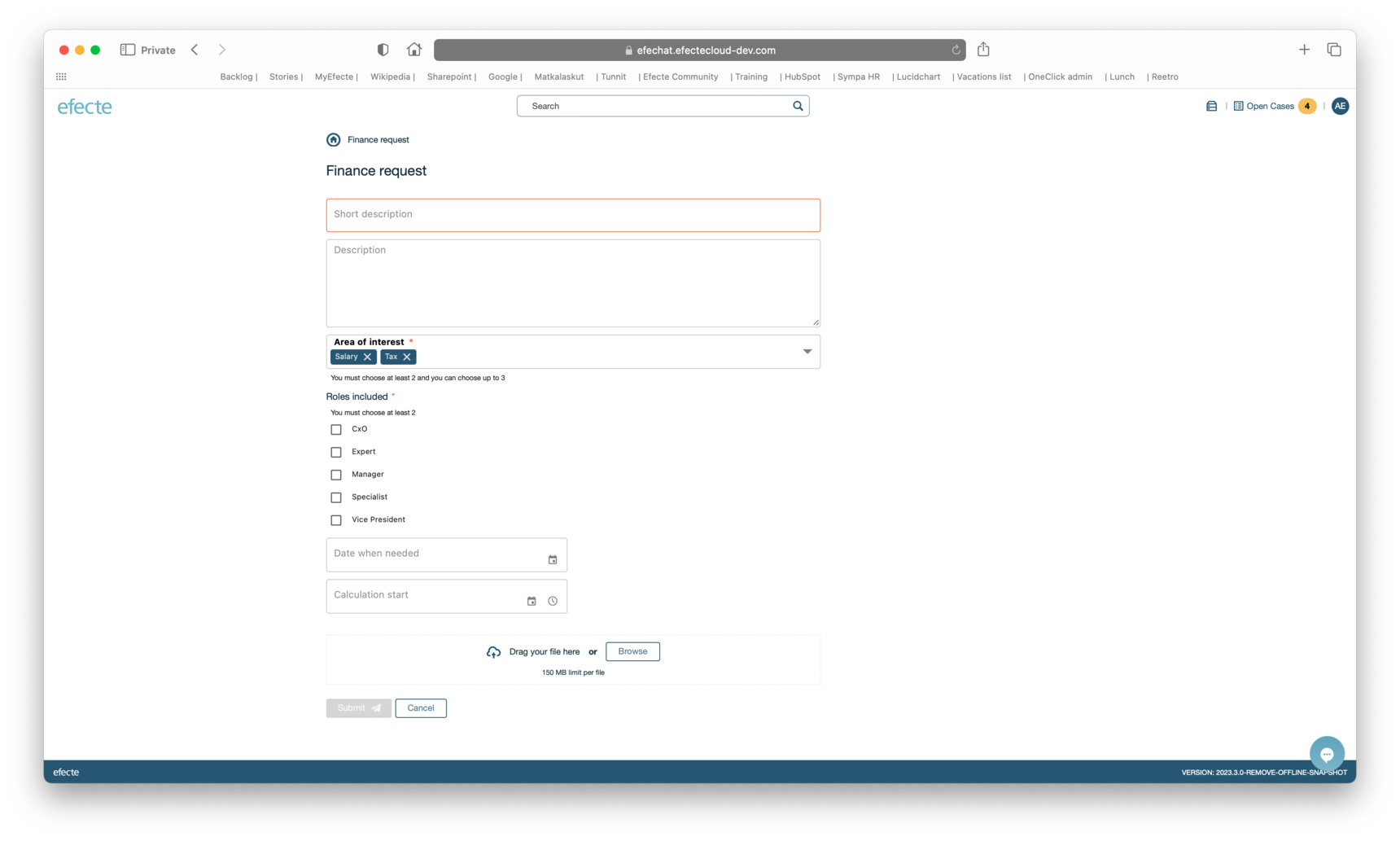
ESS2 will introduce four new types of fields for admins to configure in the ESS2 Forms: date, date and time, multi-value static string and checkbox.
Language Support
This version supports the following languages: English (US), Finnish, German, Spanish, Polish, and Swedish.
Note
This version of Efecte Self-Service 2 requires:
Efecte Service Management version 2023.3.7 or newer.
Release notes - 2023.3.0
Story
ESP-4619 Creating a group from a panel
Release note
While managing a Panel the user can choose to create a new Panel Group
ESP-4634 Managing group from a panel
Release note
A Self Service Administrator can navigate to the Panel Group while managing Panel.
ESP-5147 Required form fields
Release note
Any form field can be set to be required so that the end user cannot submit a form until required fields are filled.
ESP-5173 Override defaults for Form fields
Release note
An ESS2 admin can define override values which will be set to datacard when it is created through the ESS2.
The administrator can set "Override values" to each Form by navigating to its configuration tab on self-service admin page by adding a new override value by pressing "New override" on table configuration area. Supported data types are string, static string and text fields. When values are set in the configurator, all datacards that are created will use given override values of used form. In case the admin defines a form field, and override value to same target attribute, the user input to form field overrides form specific override value.
ESP-5344 Manage Forms
Release note
Administrators shall manage forms in the new configuration area under the Self-service settings. The admin can no anymore edit the self-service forms under the Template tree.
ESP-5931 Date and DateTime picker
Release note
The admin can specify a date or date/time input field in the Forms. If the date or date/time is selected, the end user can set values while filling out the Form. The values set to Form are sent to the mapped attribute field of created data card.
ESP-5959 Efecte Chat running on ESS2
Release note
ESS2 supports Efecte Chat use cases:
- End user can access chat in ESS2
- Support agent can access chat in ESM
- Support agent can identify the end user
- End user can identify the agent
- Opening a new ticket from chat link
- Automatic ticket creation from chatbot
ESP-5993 Multi-select drop-down input field
Release note
Admin can add a multi-select drop-down field to the ESS2 Form from the list of target template attributes that are configured as a multi-value static string. When configuring the form, the admin can define this field's minimum and maximum number of selections.
ESP-6009 Checkbox
Release note
The administrator can select a checkbox field to Forms from a list of multi-value static string attributes. The admin can specify the required and maximum number of selections on the Checkbox configuration.
ESP-6228 Present Static Strings as Drop-down fields
Release note
A new field option - “Drop-down” is introduced. When choosing a Target attribute, it only shows String attributes marked as Static. On ESS2 UI the drop-downs should be seen as Drop-down fields.
ESP-6339 Search for Forms
Release note
Search including the words in the form name. Selecting a form name on the search box will open the form page.
ESP-6412 Renew Search result page
Release note
The renewed search results page shows all search results on a separate page with more details. The page shows the string that was used for search, along with the number of results (e.g. 3 results found for ‘phone’). Search results are shown as a vertical list and they are ordered alphabetically. On results product items have category, description, price and delivery time and optionally the image, which is the same image used on catalogue view, if defined.
For product items:
On the desktop: the description is displayed up to a maximum of 3 lines, using 3 ellipses to indicate more content.
On the mobile: the description is displayed up to a maximum of 2 lines, using 3 ellipses to indicate more content.
ESP-6425 Filtering the Search result page results
Release note
On Search results -page, results can be filtered with tabs. Filtering tabs are, in the order: All results, Forms, Products.
ESP-6438 Pagination on Search results -page
Release note
The search results are displayed with pagination. The pagination navigation element is at the bottom of search results, along with number of results/pages information. The admin can configure the amount of results per page under the 'Settings' → 'Search Settings' where the minimum pagination can be 10 per page and maximum 100 per page. Default is 25 per page.
ESP-6512 Improve Search Functionality with Keywords
Release note
Administrators can add keywords to Forms and Product items so that end users can find more relevant results when searching. Note: Because of the nature of the search engine, it is recommended to use keywords of more than four characters to get the best search results.
ESP-6545 Duplicate a form
Release note
The administrator can duplicate existing form from the list of forms and from the managing forms view.
Improvements
ESP-4104 Minimum character search should show the range which the setting can be put visually.
Release note
Search setting allowed value interval is visible for the Administrators on ESM admin UI.
ESP-5060 Update price to include 2 decimal places
Release note
The price will be displayed always with 2 decimal places (e.g. price 100 will displayed as 100.00, price 100.6 will displayed as 100.60 and special case price 100.019 will round up and displayed as 100.02).
ESP-5169 You have to precisely press correct location to expand category in mobile
Release note
The end user can extend the category content of the catalog by clicking anywhere on top of the category title.
ESP-5387 Clean up "Run system status" from ESS2 topics
Release note
Run System Check action is cleaned from unnecessary ESS2 topics.
ESP-6044 Prompt when navigating away from form, panel, or panel group after editing.
Release note
Back button removed from the Edit Panel and Edit Panel group pages. In case the the admin changes any details on the Edit Panel, Edit Panel Group, or Edit Form page, the title updates to include …”(unsaved)”.
When creating/editing a Panel, Panel Group, or Form, if there is unsaved data and the user presses any button in the main frame that navigates away from the current settings (e.g. New Panel Group, or Duplicate), then they are advised they will lose information.
ESP-6377 Misalignment in footer
Release note
Right-side margin is adjusted to match leht-side margin on ESS2 UI.
ESP-6378 Status balls still visible in detailed view
Release note
String of pearls removed from the detailed view of the issue.
ESP-6380 Browser back button does not work in catalog
Release note
Browser's back button functionality on admin pages improved.
ESP-6381 In detail view, the selected tab indicates as clickable
Release note
If only one tab is visible on detailed view of the issue, ESS2 UI doesn't show tabs at all.
ESP-6384 Breadcrumbs to Catalog in Catalog takes you to nowhere but causes title and url of the page to switch from catalog to category
Release note
“Order something” part of breadcrumb is no more clickable.
ESP-6385 User panel repeats both "Open cases" and "Approvals" from header
Release note
Removed links from the User details panel to avoid unnecessary repetition.
ESP-6387 Changing custom colors hardly changes anything
Release note
Custom colors doesn't have impact on any text colors, icons colors, etc content on ESS2 pages
ESP-6394 Browser back button not working correct on subpages 'order something'
Release note
Browser's back button functionality improved on ESS2 UI.
ESP-6605 Edit any panel, panel group, or form by clicking on the table row
Release note
When the adminstrator is on the list of Panels or Panel groups, the admin can click on an individual row/panel to go to edit mode for that panel or panel group.
When the adminstrator is on the list of Forms or Form fields, the admin can click on an individual row/form to go to edit mode for that form or form field.
ESP-6648 Enable clearing selected value for ESS2 drop-down fields
Release note
The dropdown selection will have a clear button, which allows user to clear the selected option.
ESP-7804 Make searching from the ESS2 comments configurable
Release note
CommentHandler search through ESM search can be enabled by platform setting ‘entity.search.from.child.datacards’. By default, the search from comments handled by the CommentHandler is disabled.
Bug
ESP-5736 Pressing enter on homepage input fields will open first link configuration for component
Release note
Usability on ESM Self-Service admin pages improved when pressing Enter.
ESP-5888 Catalog icon in header does not use system defined icon.
Release note
Catalog icon on header uses icon set in the system settings.
ESP-6064 Content scrolling on mobile overlaps text
Release note
Content scrolling on mobile device UI's improved.
ESP-6095 Value of platform setting comment.handler.comment.max.length cannot be edited
Release note
Setting comment.handler.comment.max.length is now visible and moved from ESS2 property group to Handler settings.
ESP-6329 User gets white page when past URL to create a new request but the form not exists
Release note
Fixed the user getting the white screen when pasting an URL to the form, which was unpublished by admin.
ESP-6665 / CP-7375 Something is causing orphaned form fields
Release note
Fixed the issue when detaching a group from a form causing now the group and all its attributes to be deleted. That prevented orphan groups and attributes to be left hanging in the system when a form has been changed.
ESP-6885 Bad request error on page load
Release note
Unnecessary error toast messages cleaned from the ESS2 homepage UI.
ESP-7079 Save button not disabling while saving form in progress
Release note
Save button is disabled during the save process and the three dots loader is shown instead of text ‘Save’.
ESP-7113 ESS related platform settings should be editable without ESS2 license
Release note
Platform settings ngss.force.datacard.save, ngss.public.key.client.connection.timeout and ngss.public.key.client.read.timeout are visible in platform settings editor.
ESP-7617 / CP-7786: ESS2 comment breaks datacard history
Release note
Data card history issue with ESS2 fixed.
ESP-7592 / ESP-7900 Stream not utilized when fetching service catalog / Log entries cleaning
Release note
Unneccessary log entries are hidden.
Table of Contents