ESS: Configuring Tips & tricks
Overview
Efecte Self-Service (ESS) allows publishing knowledge base articles from Efecte Service Management (ESM). This guide provides basic instructions on how to use the feature and make the categorization of articles work. In addition, simple instructions are provided to set everything up on ESS and ESM products.
This article describes the behavior of Tips & tricks in ESS version 2022.3 or newer.
Knowledge base articles are organized under categories based on the support domain and categories in ESS. This allows for improved visualization and organization of articles following the same organization that is utilized in publishing the support domains. For knowledge base articles that cannot be matched with any existing category, there exists a default category <Miscellaneous>.
By default, knowledge base articles published to ESS are visible to all users under a tenant. Article separation based on the roles is supported where ESM configurations match for filtering. Articles separation based on sites is not supported. The knowledge base articles are also available through problem reporting, where keywords present in articles are used to search for relevant articles when users start reporting the issues they face. Should you not want the search facility to be presented to the users, keyword attribute must be kept empty in the Efecte Service Management.
To improve the quality of knowledge base articles, reporting the times an article is read and the rating the quality of an article is also possible.

Configuring Efecte Service Management
To provide data for Tips & Tricks, ‘Knowledge Base article’-template is required in ESM. This template is provided with the basic configuration package and can be imported manually to an existing environment that does not yet contain the template.
ESM is the only system that can be used as a source for ESS Tips & Tricks data.
Publishing an article to Efecte Self-Service
When creating and publishing a knowledge base article to Efecte Self-Service, there are a couple of important things to be considered.
-
Solution Name
- Solution name is used as the title for the article when published. Pay attention in keeping the title concise, yet descriptive to allow the employees to immediately identify whether the article is of value to them.
-
Detailed Description
- Detailed description provides the details of the article. It is possible to use simple html tags in the body of the message. The main purpose is to provide enough information to the employees to help them help themselves. In addition, the description may contain links to webpages, e.g., with images that guide the end user.
- Note! Uploading an image to the rich text enabled Detailed description field is not officially supported on the Self-Service portal even if the image is visible on Tips & Tricks articles. Having many large images on Tips & Tricks articles might have negative impact on the ESS performance.
-
Published in Self-Service
- When you want to publish an article in ESS, set this parameter to “Yes”. Default value when creating a new Knowledge Base Article is ‘No’. If the value is ‘No’, the article is not published on the Self-service Portal. Once the value is changed, the update is visible after next update fetch from the Service Management tool.
-
Support category
- The support category set here needs to match with the Category ID in the ESS. If there is no matching Category ID, the article will be published in the “Miscellaneous” category.

Configuring article ratings in Efecte Service Management
To ensure reporting for knowledgebase articles is possible in ESM, ensure the attribute to which ESS is sending the ratings has AverageHandler configured for it. As you select AverageHandler for the attribute, the datatype selection happens automatically and must be Decimal number.

To handle the visualizations, make the following configurations to the attribute metadata.

Configuring count of reads in Efecte Service Management
To learn which articles are the most popular in terms of how many times each article is read, a facility exists to allow reporting from Efecte Self-Service to Efecte Service Management each time an article is expanded to be read. To support this, Efecte Service Management needs to be properly configured.
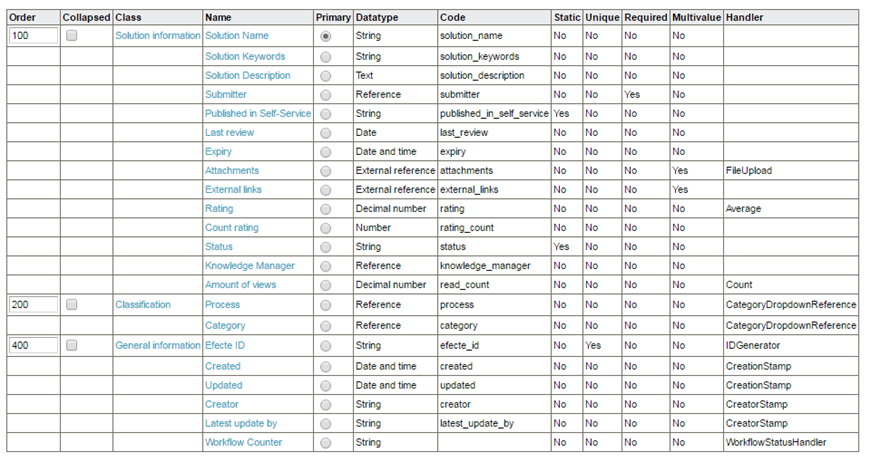
The attribute needs to be assigned the Count handler. The handler requires no metadata, but general metadata according to data type can be used.
Filtering Tips&Tricks by role
In the ESS, Tips & Tricks -articles can be filtered to end users by combining end-user’s AD Groups and the AD Groups linked to the knowledge base article in the ESM. If there are no AD Groups linked to knowledge base articles in the ESM, and the articles are set to be visible at the ESS, they are globally accessible for everyone in the ESS tenant environment.

For AD Group based Tips & Tricks filtering, following configuration shall exist in the ESM:
- The template code for knowledge base article -template shall be “knowledge_base_article” in the ESM (or the one defined in the connector)
- The attribute code in the knowledge base article -template for linking AD Groups shall be “ad_groups” (default value is ad_groups, which can be changed in the connector)
- The attribute referring from knowledge base -template to AD Group -template can be multi-value reference.
If there are many AD Groups set to the knowledge base article -data card in the ESM, only the users who have the same AD Groups (or Roles) in the EIM will see corresponding Tips &Tricks -articles. If the AD Groups -attribute is empty, Tips&Tricks -articles are visible for everyone.
Note! In the Efecte identity management solution (EIM), the agent’s “Permissions” -tab shows the “Display name” of the roles. The ESS uses EIM’s role value “Name” for filtering Tips & Tricks to the logged users. In case you want to check the filtering value, you need to search for corresponding “Role” in the EIM and check its “Name” value. The name value is however imported to the ESM.
Tips&Tricks in Efecte Self-Service
In Efecte Self-Service focus needs to be put on the proper configuration of the Efecte connector as well as making sure the problem domains are correctly configured to allow full benefit taken from categorization. Further, the Tips&Tricks needs to be enabled on the tenant administration page.
Note! Only one connector may be configured to fetch knowledge base articles at one time!
Enabling Tips&Tricks through the Admin UI
The tenant administrator is able to control the visibility of Tips & Tricks option as well as enabling rating from the Settings tab.

Configuring the Integration Suite
All configuration files for Integration Suite are located in /etc/integration-hub/ directory and it's subdirectories.
Configuring connector-efecte.xml
To configure support for "Tips & Tricks" in Integration Agent please edit connector-efecte.xml file. Add bean of class "EfecteKnowledgeBaseConnector" and provide it with ESM connection configuration bean.
<bean id="connectionConfiguration"
	class="com.efecte.integration.connector.configuration.ConnectionConfiguration">
	<property name="url"
	value="http://itsm.efecte.com:8080" />
	<property name="user" value=" webapi-user" />
	<property name="password" value="" />
	</bean>
	<bean id="efecteKnowledgeBaseConnector" class="com.efecte.integration.connector.efecte.EfecteKnowledgeBaseConnector">
	<property name="connectionConfiguration" ref="connectionConfiguration"/>
	</bean>
It’s a good practice to share connection configuration between Efecte connectors. So the code:
   <bean id="defaultConnectorEfecte" class="com.efecte.integration.connector.efecte.EfecteConnector">
   <property name="connectionConfiguration"><bean
   class="com.efecte.integration.connector.configuration.ConnectionConfiguration">
   <property name="url" value=" http://itsm.efecte.com:8080" /><property name="user" value="webapi-user" />
   <property name="password" value="" /></bean>
   </property>
   </bean>
can be replaced with:
   <bean id="defaultConnectorEfecte"
   class="com.efecte.integration.connector.efecte.EfecteConnector">
   <property name="connectionConfiguration" ref="connectionConfiguration"/>
   </bean>
Configuring template parameters
In order to adjust names of attributes used in ESM for Knowledge Base support, add property knowledgeBaseAttributes to efecteKnowledgeBaseConnector bean and configure the template parameters. Otherwise default settings will be used.
<bean id="efecteKnowledgeBaseConnector" class="com.efecte.integration.connector.efecte.EfecteKnowledgeBaseConnector">
  <property name="connectionConfiguration" ref="connectionConfiguration"/>
  <property name="knowledgeBaseAttributes" >
    <bean id="knowledgeBaseAttributes" class="com.efecte.integration.connector.configuration.KnowledgeBaseAttributes">
      <property name="templateCode" value="knowledge_base_article"/>
      <property name="pollingFolderCode" value="knowledge_base"/>
      <property name="updateReadStatsFallbackFolderCode" value="knowledge_base"/>
      <property name="ratingFallbackFolderCode" value="knowledge_base"/>
      <property name="publishedInEssAttr" value="published_in_self_service"/>
      <property name="publishedInEssValue" value="Yes"/>
      <property name="deletedAttr" value="deleted"/>
      <property name="nameAttr" value="solution_name"/>
      <property name="descriptionAttr" value="solution_description"/>
      <property name="categoryAttr" value="category"/>
      <property name="adGroupsAttr" value="ad_groups"/>
      <property name="efecteIdAttr" value="efecte_id"/>
      <property name="updatedAttr" value="updated"/>
      <property name="ratingAttr" value="rating"/>
<property name="rankingAttr" value="rating"/>
<property name="readStatsAttr" value="read_count"/>
<property name="keywordsAttr" value="solution_keywords"/>
       <property name="keywordsSeparator" value=","/>
    </bean>
  </property>
</bean>
Following properties for KnowledgeBaseAttributes class bean are supported:
| Name | Default value | Description |
|---|---|---|
| templateCode | knowledge_base_article | Knowledge Base template code |
| pollingFolderCode | if pollingFolderCode is defined then articles are polled only from this folder. If pollingFolderCode is NOT defined then articles are polled without folder limitation. |
|
| ratingFallbackFolderCode | knowledge_base | Name of fallback folder code used when saving vote. |
| updateReadStatsFallbackFolderCode | knowledge_base | Name of fallback folder code used when updating read stats. |
| publishedInEssAttr | published_in_self_service | Name of attribute, indicating if article should be fetch to ESS |
| publishedInEssValue | Yes | Value of attribute named in publishedInEssAttr indicating that article should be fetched. |
| deletedAttr | deleted | Name of attribute, indicating if KB article is deleted |
| nameAttr | solution_name | Name of attribute that contains name of KB article |
| descriptionAttr | solution_description | Name of attribute that contains content of KB article |
| categoryAttr | category | Name of attribute that contains category of KB article |
| adGroupsAttr | ad_groups | ESM attribute that is used for Tips & Tricks filtering based on the EIM role of logged user |
| efecteIdAttr | efecte_id | Name of attribute that contains efecte id of KB article |
| updatedAttr | updated | Name of attribute that contains last update date of KB article |
| ratingAttr | rating | Name of attribute, indicating where knowledge base feedback should be stored |
| rankingAttr | rating | Name of attribute, indicating where knowledge base ranking is stored |
| readStatsAttr | read_count | Name of attribute that contains read statistic of KB article |
| keywordsAttr | solution_keywords | Name of the attribute that contains the keywords of a KB article |
|
keywordsSeparator
|
, | If a KB article has multiple keywords, this keyword separator must be used |
Configuring ”Tips&Tricks” update frequency
By default, Tips&Tricks are updated every 2 hours. If error occurs, refresh is retried every 2 minutes until successful update.
Update and error update frequencies can be configured in connector xml configuration (connector-efecte.xml). Please use following properties:
| Name | Default value | Description |
| updateFrequency | 2 | Refresh period when knowledge base was fetch with success (default: 2 hours) |
| updateFrequencyUnit | HOURS | Refresh period frequency unit (successful) |
| errorUpdateFrequency | 2 | Refresh period when knowledge base fetch fails (default: 2 minutes) |
| errorUpdateFrequencyUnit | MINUTES | Refresh period frequency unit (error) |
The example configuration:
<bean id="efecteKnowledgeBaseConnector" class="com.efecte.integration.connector.efecte.EfecteKnowledgeBaseConnector">
 <property name="connectionConfiguration" ref="connectionConfiguration"/>
 <property name="updateFrequency" value="30"/>
 <property name="updateFrequencyUnit" value="SECONDS"/>
</bean>
Configuring support domains to support categorisation
Support domains and Category IDs are used to categorise the knowledge base articles under each Tips&Tricks category. This categorisation is automatic and happens through matching the Category ID with the category assigned to an article in the ESM.
When a matching Category ID is found, an article is published under that category using the icon and heading for the parent Support domain. In case the same category exists under several domains, the article will be published under each of the domains.
Note! The category ID handling in ESS is case sensitive.
If there is no match between the ‘Knowledge Base Article’-category coming from ESM and the Category IDs defined in Efecte Self-Service, the article will be shown in the default category “Miscellaneous” with default icon.
Only those support domains and icons that have associated knowledge base articles are shown in the Tips&Tricks section
Note! Custom icons are not currently supported to be shown in the Tips & Tricks categories.
Supported html tags
The knowledge base articles may contain html tags that are used to format the articles published to end-users. The table below depicts the supported tags.
| Supported HTML tags | |
| <em>, <i> | Italic |
| <strong>, <b> | Bold |
| <u> | Underline |
| <ol> & <li> | Ordered list |
| <ul> & <li> | Unordered list |
| <a href=”https://www.example.com”>Example</a> | Hyperlink |
| <a href=https://www.example.com target=_blank”>Example</a> | Hyperlink opening to new window |
| <br> | Line break |
| <p> | Paragraph |
| <span >, <span style="color: #ff9900;"> | Group inline elements for font colors |
| <img src=”http://www.example.com/pics/cats/123abc.jpg” /> | Link to image |
Table of Contents