Efecte Provisioning Engine and Secure Access 2023.3.0 release notes
EPE & ESA
Efecte Provisioning Engine and Secure Access 2023.3.0 release notes
EPE & ESA

EFECTE PROVISIONING ENGINE RELEASE NOTES 2023.3.0
Efecte Provisioning Engine is one of the Efecte Cloud components. It provides multiple different provisioning functions to Efecte solutions, build on top of Efecte Service Management Platform.
Executive summary
Efecte provisioning engine to own tab
Efecte provisioning engine is moved from Schedulable tasks to own tab called IGA. Existing tasks will be moved here automatically. This does not require any maintenance. This change clarifies the difference between schedulable tasks and provisioning tasks. And the administrator user no longer needs to drag the mouse down to access the provisioning tasks

Various Provisioning improvements
This release includes several improvements to the provisioning engine user interface that improve usability, reduce error situations and guides the administrator in configuration.
The EPE Administrator can now choose which realm the authentication task is created in ESA. This feature is good for environments where many different ESA realms are in use.

Before Scheduled based task's Run task manually was only possible to perform when it was scheduled. Starting from this release it can be run manually when it’s not scheduled and when it’s scheduled. This helps with testing when you only want to run the data once and not on a scheduled basis.

Scheduled-based Provisioning Task has a new option to read only groups or only users. Before both of them was required. This option removes extra error messages in environments where no users or groups are imported at all.

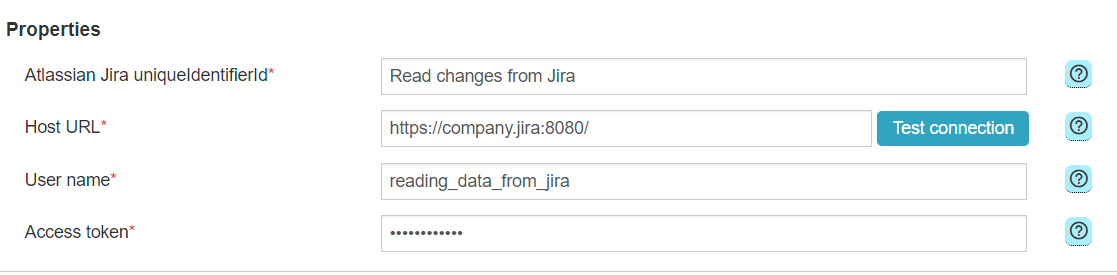
New Atlassian Jira connector (only for IGA solution)
The EPE 2023.3.0 release introduces capability to connect between Atlassian Jira via Efecte provisioning engine.
EPE Administrators are able configure connection to Jira using the EPE admin UI.
Processes can be run event-based triggered by Visual Workflow Automation.

New features for managing local users
The EPE 2023.3.0 release introduces capability to change ESM local user's username and delete local ESM users via workflow orchestration node. These provisioning features enables ESM local user lifecycle management. You can delete the local user with workflow rule and if there is a name change for the user it can be handled with workflow.


You can find the complete list of improvements and feature included within the 2023.3.0 EPE release below.
EPE Release notes 2023.3.0
Features
| Change ID | Description | Notes |
|---|---|---|
| IGA-4930 | Authentication task option to choose the realm | Authentication task option to choose the realm where identity provider is created in ESA |
| IGA-5056 | Scheduled-based Provisioning Task can be test run without scheduling | Scheduled based task can be run manually when it’s not scheduled and when it’s scheduled |
| IGA-5188 | Efecte provisioning engine own tab | Efecte provisioning engine is moved from Schedulable tasks to own tab called IGA. Read more from the community. |
| IGA-5215 | Scheduled-based Provisioning Task new option to read only groups or only users | Administrator can choose Mappings type for scheduled-based task. Mappings types are: Identity & Access rights - users and groups mappings are available Identity only - only Users mappings are available Access Rights only - only Groups' mappings are available Generic (One template) - template mappings are available Default is Identity & Access rights |
| IGA-5306 | Possibility update ESM local user's username with provisioning engine | New Workflow activity - Update local User username (from ESM). Read more from the community. |
| IGA-5357 | New Efecte Jira Connector | Read more from the community. |
| IGA-5378 | Possibility delete ESM local user with provisioning engine | New workflow activity - Delete local User (from ESM). Read more from the community. |
Improvements
| Change ID | Description | Notes |
|---|---|---|
| IGA-1678 | EPE UI displays the scheduled times using the user’s local time | User interface improvement. User can now see the EPE sheduling times in user's local time. |
| IGA-4958 | Provisioning Task filters target folder by target template | Target folder is filtered based on the template. User cannot anymore choose wrong folder where template is not allowed. |
| IGA-5057 | The names of the directories have been renewed |
New names are: Microsoft Azure AD |
| IGA-5067 | No empty statuses are displayed in Load status | Before the empty status in LOAD STATUS TO ESM meant that data export will be handled afterwards. Now status for this state is WAITING_EXECUTION |
| IGA-5088 | Error handling improvement: a ticket to ESM | A ticket (incident, IGA Administration task or is selectable) to ESM is created if scheduled-based EPEtask fails. Read more from the community. |
| IGA-5191 | Help texts added to log files | Help texts added for logs buttons in IGA config view |
| IGA-5554 | ESM connector help text improvement | The content of the help texts has been specified. |
| IGA-5173 | Credentials are encrypted in database | Security improvement. |
Bugs
| Change ID | Description | Notes |
|---|---|---|
| IGA-5298 | Authentication task syncs OpenID as SAML identity provider | If OpenID Authentication task was made in ESM, it was synced as SAML task in ESA. This is fixed. |
| IGA-5289 | OWAS report vulnerability | Fixed. |
| IGA-5559 | No users in JSON file leads to error | When there are no users in Json file, EPE reports that failed to export users. Fixed. |
EFECTE SECURE ACCESS RELEASE NOTES 2023.3.0
Efecte Secure Access (ESA) is an authentication component for the Efecte platform. ESA provides authentication & authorization capabilities to the Efecte platform, including Efecte Self-Service and Efecte Service Management.
Executive summary
Login page usability improvements
Now its possible to hide “Login with Directory account” button from the login screen. This feature reduces errors in login if only local ESM users are in use.

The login language menu is selectable from the keyboard. All functions of the ESA login page are now be available on the screen reader and keyboard.

You can find the complete list of improvements and fixes included within the 2023.3 ESA release below.
ESA Release Notes 2023.3
Features
| Change ID | Description | Notes |
|---|---|---|
| IGA-5136 | Possibility hide "Login with Directory account" button from the login screen | This feature is needed when there is only local ESM user login in use |
Improvements
| Change ID | Description | Notes |
|---|---|---|
| IGA-5087 | The login language menu is selectable from the keyboard | All functions of the ESA login page are now be available on the screen reader and keyboard. Read more from community. |
| IGA-5191 | Help texts added to log files | Help texts added for log buttons in IGA config view |
Bugs
| Change ID | Description | Notes |
|---|---|---|
| IGA-5579 | Whistleblower Copy username and password button is not editable | Whistleblower Copy username and password button was editable, not anymore. |
Table of Contents